Dear Seller,
Please note DHL express has extended the limit of shipping via CSB V up to maximum of INR 500000.
Regards,
eBay Global Shipping

Dear Seller,
Please note DHL express has extended the limit of shipping via CSB V up to maximum of INR 500000.
Regards,
eBay Global Shipping
Dear Seller,
eBay Global Shipping platform will be on maintenance from 09:30 PM to 12:00 AM on 05th Octomber 2020.
Regards,
Team eBay Global Shipping
Dear Seller,
Greetings from eBay!
We are pleased to inform you that effective 1 st October 2020, a price reduction by an average
12% for the DHL eCommerce service: DHL Parcel Direct (PLT) for the Countries UK, Australia
and Canada will be applicable on eBay Global Shipping .
For a detailed revised price list, click on https://www.ebayglobalshipping.com/tnc in the eBay
Global shipping site.
In case of any further queries, kindly contact your eBay Account Manager or eBay Global
Shipping Team.
Stay Safe!
Regards,
Team eBay Global Shipping
Dear Seller,
As per the customs notification “Public notice no. 24/2020 issued, vide C No. VIII (12)/ACE/Tech/PN/06/2020-21 dated 29.07.2020” ECCS is live in Delhi port for CSB V & IV from August 2020.
To ensure activation of your DHL eCommerce account and seamless clearance of your export shipments, we request you to submit the following details in soft copy to the DHL ecommerce Account manager , with the EGS team in CC .
For activation via CSB V , seller has to submit
1.LUT /Bond or a letter on the company letter head stating seller agrees to submit the Invoice with GST payment
2 AD Code
For activation via CSB IV , seller has to submit
1. LUT /Bond or a letter on the company letter head stating seller agrees to submit the Invoice with GST payment
2. AD code is not mandatory ( However we strongly recommend to have AD code handy for CSB IV shipments incase if its required in future as per regulatory guideline)
If the above details are not shared with the LSP, you could see an error while booking your shipments.
For Shipments booked via CSB IV please note :
In case of any clarifications please contact your DHL Ecommerce account manager or the EGS team
Regards,
eBay Global Shipping team
Dear Seller,
Greeting from ebay!!!
We are committed to improve your shipping experience on eBay Global Shipping platform (“EGS”) and with this aim, we are happy to inform you that we have revamped the Account Opening Registration Page. PFB updates-
Personal Settings:
When you click on your user profile you will be directed to the Personal Settings page. Two new fields have been added as below -
Select Form of Organization: Kindly select the appropriate option from the dropdown. The value selected will reflect the respective document fields on the KYC/Common Documents tab.
PAN: Kindly enter a valid PAN no.
Pickup Addresses:
This page displays all the pickup addresses that you have added. You can add a new address by clicking on the Add Address button. The section adjacent to the address specifies whether the LSPs have Approved/Disapproved the address with subsequent remarks (if any).
If the address is disapproved, you will be able to view the reason for disapproval in the remark column as shown in the screenshot below-
KYC/Common Documents:
This page displays the related document fields with respect to the form of organization selected on the Personal Settings tab. The below screenshot refers to a seller who has selected Company as his form of organization.
An additional option has been provided to upload the AD code on the bank letter head.
After uploading the necessary documents, kindly click on the Submit button to submit the documents. Once the documents are submitted the tab will be disabled and you will not be able to re-upload the documents.
Logistic Partners:
This page displays all the Logistic Service Providers (LSP) associated with EGS portal.
Kindly click on the checkbox associated with LSPs and upload the respective documents and click on the Apply button in order to apply for the account opening process. The documents submitted on the KYC/Common Documents tab will be displayed in a disabled field for all the LSPs.
Each document will have a Status attribute which will display the current status of the document along with the date.
For E.g. The status of a document could be as follows -
Uploaded: This indicates that the you have uploaded the document.
Approved: This indicates that the LSP has approved the document.
Disapproved: This indicates that the LSP has disapproved the document.
N.A: This indicates that no action has been taken against the document.
Each document will have a Remarks attribute which will display the remarks from the LSPs.
You can view the current status of the approval process to the extreme right of the LSPs name on the accordion bar.
The status of the approval process will be as follows -
Pending
Approved
Disapproved
The Below screenshot refers to a seller who has successfully applied for an account opening request for Aramex.
In case of any further queries, kindly contact your eBay Account Manager or eBay Global Shipping Team.
Regards,
Team eBay Global Shipping
Dear Seller,
Kindly update your AD code in the Personal details tab along with the GSTIN no in pick up address TAB.
Thanks,
eBay Global shipping
Dear Seller,
Greetings from eBay!!!
DHL eCommerce is currently upgrading their systems to align with the new regulations and to enable the shipments to be filed under ECCS – CSB V & IV environment. Due to this up-gradation you might face issues while booking your shipments, incase of issue please reach out directly to your DHL Ecommerce Account manager for resolution.
To ensure seamless clearance and export of your shipments, we request you to submit the shipment invoice as per the new ECCS format directly to DHL eCommerce. Shipments sent under the new ECCS format only will be considered for customs clearance and further connection and delivery.
Request your support and understanding for seamless movement of your shipments. Apologies for the inconvenience caused.
Regards,
Team eBay Global Shipping
Dear Seller,
Greetings from ebay !!!
There is an over all delay in the transit time due to the tremendous pressure to clear the backlog of pending shipments and packages stuck at the airports. The backlog is also due to the 100% customs check of the shipments at the origin and with flight capacity across the world continuing to be constant, there are inordinate delays in the connection, transit and next level scans of shipments on which Logistic Service Providers (LSPs) have limited control currently hence LSPs are unable to quote any guaranteed transit time under current situation
Please note below the approx. extended transit time :
|
LSP |
Delivery Timelines (Working Days) |
|
LEXship |
25 to 40 days |
|
DHL eCommerce |
27 to 45 days |
|
FedEx |
5 to 10 days |
|
DHL Express |
5 to 10 days |
|
Aramex |
10 to 15 days |
Regards,
Team eBay Global Shipping
Dear Seller,
Greetings from eBay!
It has been a great journey so far and we believe it will only get better in the coming years. We want to take this opportunity to thank each one of you for your wholehearted support and confidence that you have placed in eBay Global Shipping Program.
We wish to inform you regarding the price revision effective August 3, 2020 for the below Logistic Service Providers-
1. DHL Express
2. DHL eCommerce
For a detailed revised price list, click on the T&C page in the eBay Global Shipping
Site: https://www.ebayglobalshipping.com/tnc-pricing
For any queries or clarification, feel free to write to us or contact your eBay account support.
Thank you,
eBay Global Shipping Team.
Dear Seller,
We wish to inform you that we are coordinating with our logistic service providers to develop the best solutions to deliver your commodities in a streamlined and efficient manner.
In view of that we are pleased to inform you that DHL eCommerce has extended their Parcel Direct service to Europe and Canada effective 8th July 2020.
For further details on the pricing please refer to the T&C page on www.ebayglobalshipping.com
Regards,
eBay Global Shipping Team.
Dear Seller,
Greetings from ebay !!!
There is an over all delay in the transit time due to the tremendous pressure to clear the backlog of pending shipments and packages stuck at the airports. The backlog is also due to the 100% customs check of the shipments at the origin and with flight capacity across the world continuing to be constant, there are inordinate delays in the connection, transit and next level scans of shipments on which LSPs have limited control currently.
Given below the approx. extended transit time :
Regards,
Team eBay Global Shipping
Dear Sellers,
Greetings from eBay!
We are pleased to inform you that the pickup and delivery operations for DHL Express and FedEx Express have resumed for limited postal codes.
The disruption and uncertainty in the global cargo industry has increased the cost of Logistic Service Providers (LSP) for their services. Therefore, DHL Express and FedEx Express have implemented the following temporary surcharge on all shipments effective April 1, 2020 until further notice.
| Logistic Provider | Billing Method | Chargeable Weight (in Kgs) | Charge Amount (INR) |
| DHL Express | Fixed Charge | Up to 2.50 | No charge |
| Per Shipment | 2.51 – 30.00 | 200/- | |
| 30.10 – 70.00 | 1,200/- | ||
| 70.10 – 300.00 | 4,000/- | ||
| >300.00 | 16,000/- | ||
| FedEx Express | Per Parcel | Minimum Rs.73/- or Rs.17/- per kg, whichever is higher. |
In order to support our sellers for their financial position amid Covid-19, eBay has decided to provide 100% waiver of aforesaid temporary surcharge applied by DHL Express and FedEx on all shipments booked during May 2020 via eBay Global Shipping.
In case of any further queries, kindly contact your eBay Account Manager or eBay Global Shipping Team.
Good luck and Stay Safe!
Regards,
Team eBay Global Shipping
Dear Seller,
Greetings from eBay!
We wish to inform you that we are coordinating with our logistic service providers to develop the best solutions to deliver your commodities in a streamlined and efficient manner.
In view of that we are pleased to inform you that the pickup and deliveries services of DHL Express and FedEx have resumed for limited postal codes effective May 5th, 2020. However, their serviceability is
subject to change basis the applicable government notifications. We will continue to update you with more serviceable postal codes.
In case of any further queries, kindly contact your eBay Account Manager or eBay Global Shipping Team.
Stay Safe!
Regards,
Team eBay Global Shipping
Dear Sellers,
Greeting from eBay !!!
Kindly note that you will be unable to book any shipments till further notice through all below logistic service providers as they have temporarily suspended their services due to the outbreak of COVID-19 and many states across India have issued directions for a lock down until 17th May 2020 .
1.FedEx Express
2.DHL Express
3.DHL eCommerce
4.LEX ship
5.Aramex
6.Bombino Express
7.DTDC Express
We are closely monitoring the situation and taking every action necessary to maintain our service quality at its best possible level. Apologies for the inconvenience caused and thank you for your continuous support. We will keep you informed when we are able to resume our normal operations.
Regards,
Team eBay Global Shipping
Greetings from eBay!
We are committed to improve your shipping experience on eBay Global Shipping platform (“EGS”) and with this aim, we are happy to inform you that:
In light of the above, sellers are no more required to raise any dispute for shipment cancellation/Buyer info edit (for the fields mentioned above) in the Resolution Centre on the EGS portal.
Should you have any query or clarification, please feel free to contact your eBay account support.
Regards,
Team eBay Global Shipping
Dear Sellers,
Dear Sellers,
Please note the charges applied when shipping through FedEx is applicable only on “your packaging” in case you use FedEx packaging additional charges will be applicable as per the FedEx rate chart.
In order to avoid additional charges please use your packaging.
Regards,
eBay Global Shipping
Dear Sellers,
Please note the charges applied when shipping through FedEx is applicable only on “your packaging” in case you use FedEx packaging additional charges will be applicable as per the FedEx rate chart.
In order to avoid additional charges please use your packaging.
Regards,
eBay Global Shipping
Dear Seller
Greetings from eBay!
It has been a great journey so far and we believe it will only get better in the coming years. Effective 9 th
September 2019, we have made 3 major enhancements in the ebay Global Shipping portal for a smooth
experience while shipping.
Please note our main aim here is to improve your shipping experience, below are the enhancements
implemented on the Portal
1. Resolution Center: Our main aim here is to make sure all your issues are resolved within the
stipulated time. Please note the below
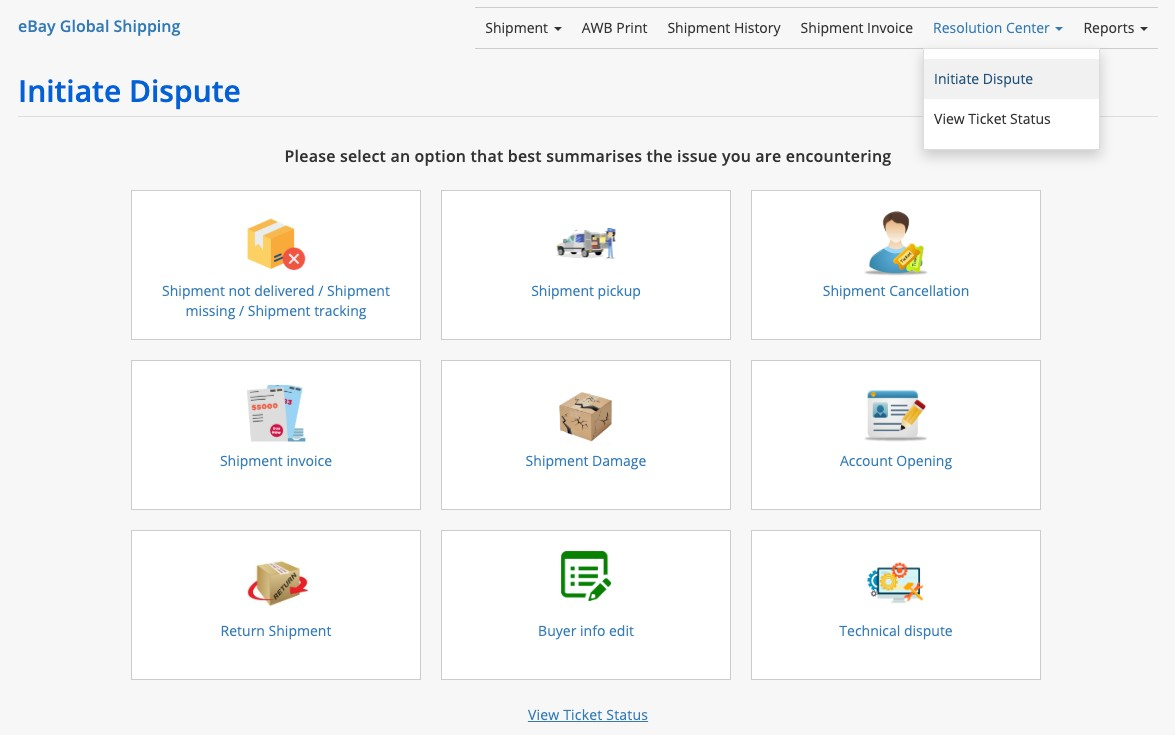
To know more please find below the screenshots of the revamped Resolution center.
2. Buyer info edit:
New interface of the resolution center
Step 1: You will get 2 options- 1) Initiate Dispute 2) View ticket status. You can click on the dispute which
best described the issue you are facing. Enter the AWB no. and proceed to initiate a dispute.
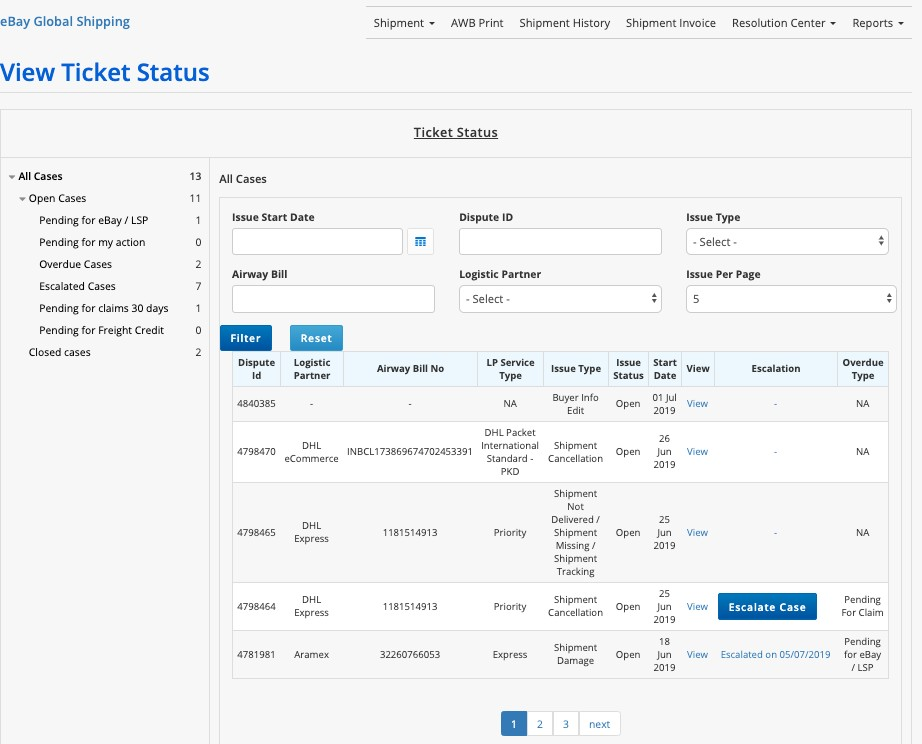
Step 2: Click on view ticket status dropdown to view the status of your ticket. We have categorized your
disputes as per the below folders. Now you can track the status of your case by clicking on the individual
folders-
Brief description of the folders -
Pending for ebay/LSP - Once you initiate a dispute the case will reflect under “Pending for ebay/LSP”.
Pending for my action – In case any information is required by the Logistic Partner or eBay, the case will
be assigned back to you and the same will reflect in the “Pending for my action’ folder.
Overdue Cases – We have set a TAT for resolving each case. Once the case has crossed the TAT, the
cases will reflect in your “Overdue” folder.
Escalated Cases - Once the case is overdue and in case you are not receiving any satisfactory response,
an escalation button will be available against the case in your overdue folder. You can click on escalate
in order to escalate that case. Once you click on the escalate button, the cases will reflect in your
“Escalated” folder.
Pending for claims 30 Days – In case any claim for the Product value needs to be settled, the same will
reflect in the “Pending for claims 30 Days” folder.
Pending for Freight Credit - In case any freight charges need to be credited from ebay global shipping,
the same will reflect in the “Pending for Freight Credit” folder.
Points to be noted while raising a dispute –
For any further clarifications, feel free to contact your eBay Account Manager or team eBay Global shipping : Shalini Sebastian: shasebastian@ebay.com, Pritish Raut: priraut@ebay.com.
Regards,
Team eBay Global Shipping
Dear Seller,
Greetings from eBay!
It has been a great journey so far and we believe it will only get better in the coming years. We want to take this opportunity to thank each one of you for your wholehearted support and confidence that you have placed in our Global Shipping Program.
We wish to inform you that effective September 1st, 2019, one of our logistics partners, FedEx Express will raise their current freight charges by 5%.
For a detailed revised price list, click on the https://www.ebayglobalshipping.com/tnc/Fedex_Services_TnC for the LSP T&C page in the eBay Global Shipping
Site: https://www.ebayglobalshipping.com/tnc-pricing
For any queries or clarification, feel free to write to us or contact your eBay account support.
Thank you,
eBay Global Shipping Team.
Dear Seller,
Commercial shipments < INR 5,00,000 is allowed through courier mode, using CSB V shipping bill applicable when shipping thorough Logistic Providers FedEx and DHL Express
Thanks,
eBay Global Shipping
Dear Seller,
Please be informed the service DHL Packet Plus International under DHL eCommerce will not be available for the country Singapore, consignments to Singapore can be shipped through the DHL Packet International – Standard service only till further notice.
For any queries feel free to contact team eBay global shipping.
Thanks,
eBay Global Shipping
Dear Sellers,
The Customs Board (CBEC) has issued a notification on August 03, 2018 which states that commercial shipments < INR 5,00,000 is allowed through courier mode, using CSB V shipping bill.
Effective today commercial shipments < INR 500000 is applicable via FedEx and DHL Express.
Please note this would be not be applicable for rest of the Logistic Partners eBay Global Shipping who are offering CSB V.
A Brief update on the CSB V
The Customs Board (CBEC) has issued a notification in August 03, 2018 which states that commercial shipments < INR 5, 00,000 is allowed through courier mode, using CSB V shipping bill.
Key Features:
Benefits:
Further information on CSB V please follow the Link https://www.ebayglobalshipping.com/about-csb-v
For queries feel free to contact your eBay Account Manager or the eBay Global Shipping Team
Regards,
Team eBay Global Shipping
Dear Seller,
As per a notification by CBEC on 27th Feb 2019 - AD (Authorized Dealer) Code has been made mandatory for shipping through CSB (Courier Shipping Bill) V. This new regulation is applicable with immediate effect.
For a more detailed understanding of the notifications, please click on the links below:
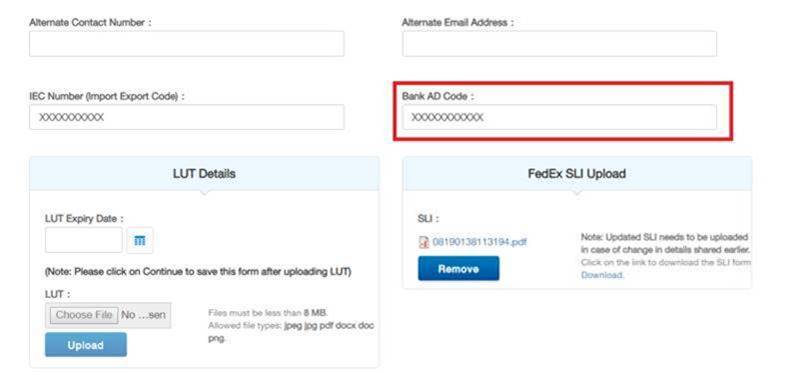
To make this change easier for you, we have incorporated an additional field in our CSB V tool. You simply need to fill the AD Code (as an additional field) in your user profile & generate the Air Way Bill (AWB).This feature is currently live with the Logistic Provider DHL Express .The AD code will be mentioned in the Invoice once you book a shipment. PFB screenshot –
In case of any queries please contact your Account Manager / Team eBay Global Shipping.
Thanks & Regards,
Team eBay Global Shipping
Dear Seller,
The customs authorities at Origin, Destination and Transiting countries insist on the valid description of goods along with HS (Harmonized System) code to be included along with shipping documents.
HS Code is an internationally accepted product coding system used by all countries globally to classify all imported and exported goods. When you are looking to ship a product overseas, it is a legal requirement that you have valid goods description with an HS code mentioned in the shipping documentation. When goods and offerings are recognized via valid goods descriptions including their specific HS codes, which are globally acceptable, the identification of goods becomes easy, and resultant possibilities of misinterpretation tend to reduce. Valid goods descriptions and HS Codes are mandatory to avoid delays, detention, possible fines, additional storage costs or repatriation in transit or at the destination.
You are hereby requested to comply with the requirement and have the correct information (Commodity Description and HS Code) at the time of booking the shipment. This will ensure complete export documentation with relevant customs authorities correctly.
Thanks,
eBay Global Shipping
Dear Seller,
We would like to inform you of a change in the shipping options available to users shipping through the eBay Global Shipping platform. Effective 15th June 2019, the below process will be applicable.
1. When the Buyer Selects expedited shipping options at the time of check out, users shipping through eBay Global Shipping will get only two shipping options:
a) DHL Express
b) FedEx – Priority
2. The two shipping options listed above will be applicable when the buyer selects from any of the expedited shipping options below during check out:
Please note the order where the buyer selects expedite will look as per the screenshot below:

Please note this change in order to enhance the seller and buyer experience while shipping the order on eBay.
In case of any queries please contact your Account Manager / Team eBay Global Shipping.
Regards,
Team eBay Global Shipping
Dear Seller,
Please be informed the logistic service provider, Aramex India Pvt Ltd, will not be shipping items to USA and Canada with effect from June 10, 2019, till further notice. We suggest using the alternative shipping services for US and Canada available under eBay Global shipping through our other logistic service providers.
For any queries feel free to contact your eBay Account Manager or team eBay global shipping.
Thanks,
eBay Global Shipping
Dear Sellers,
The below issue has been resolved and you will now be able to book the shipments via Bombino Express.
Thank You for your cooperation.
Regards,
Team eBay Global Shipping.
____________________________________________________
Dear Sellers,
You will be unable to book shipments via Bombino Express due to the following error – “This is soap fault error or time out for getting the response.” Our technical team is trying to get this issue resolved at the earliest.
Appreciate your patience and cooperation on the same.
Regards,
Team eBay Global Shipping
Dear Seller,
Your feedback is valuable to us. To help us create a better experience for you, kindly leave a feedback on - https://www.
Regards,
Team eBay Global Shipping.
Dear Seller,
Greetings from eBay!!!
This is with regards to the Aramex pick up model. Going forward, it’s imperative to have an updated Pick up address & Seller Contact details while booking shipments through the eBay Global Shipping Portal as currently, we are receiving few cases where our Pick up partner is not in a position to contact the seller which is leading to missing/Delayed pick up. We request you to kindly update the below details for a smooth transition of pickups -
Please note there should be at least 02 hours gap from the Booking till the actual pick up timings, this is critical because the Pickup team will action pick up within one hour from the time of Booking unless they don’t mention pickup time in particular.
Thank You for your support and cooperation.
Regards,
Team eBay Global Shipping.
Dear Seller
Greetings from eBay!
It has been a great journey so far and we believe it will only get better in the coming years. We want to take this opportunity to thank each one of you for your wholehearted support and confidence that you have placed in our Global Shipping Program.
We wish to inform you that effective March 1st, 2019, our logistics partners will raise their prices by an average rate as mentioned below:
|
LSP |
Average hike % |
|
DHL Express |
10% |
|
DHL eCommerce |
12% |
|
Aramex |
5% |
Please note due to operational reasons DHL Packet International – Economy service under DHL eCommerce will be discontinued after 31st March 2019.
For a detailed revised price list, please click on the LSP T&C page in the eBay Global Shipping site: https://www.
For any queries or clarification, feel free to write to us or contact your eBay account support.
Thank you,
eBay Global Shipping Team.
Dear Seller,
Please be informed that effective from 31st Jan’2019, the following changes will be applied on the shipping platform www.ebayglobalshipping.com
1. The Auto AWB sync will be applied on all the Shipments booked through eBay Global Shipping.
As per the current process on www.ebayglobalshipping.com, once an eBay sold order is booked for shipment and the AWB is generated, sellers have the option to update the details of the AWB either manually or through the Auto update function on their eBay account.
Kindly note that applying the mandate of automating the AWB update on your eBay account will help eliminate typo errors and will also help save the time taken to do the manual update on several orders at one time.
The checkout address of the buyer on the eBay site where the transaction was completed will be applicable when booking the shipment on the Shipping Platform.
For any further clarifications, feel free to contact your eBay Account Manager or team eBayglobalshipping: Shalini Sebastian: shasebastian@ebay.
Thanks,
eBay Global Shipping
Dear Sellers,
We are delighted to announce the Introduction of CSB V for eCommerce shipments effective 06th December’2018 through the Logistic Service Provider – DHL eCommerce India Pvt Ltd.
A Brief update on the CSB V
The Customs Board (CBEC) has issued a notification in August 03, 2018 which states that commercial shipments < INR 5, 00,000 is allowed through courier mode, using CSB V shipping bill.
Key Features:
Benefits:
Further information on CSB V please follow the Link https://www.
For queries feel free to contact your eBay Account Manager or the eBay Global Shipping Team: Shalini Sebastian: shasebastian@ebay.com, Pritish Raut: priraut@ebay.com and Carolyn Chalissary: cchalissary@ebay.com.
Regards,
Team eBay Global Shipping
Dear Sellers,
We are delighted to announce the Introduction of CSB V for eCommerce shipments effective 13th November’2018 through the Logistic Service Provider – FedEx Express Pvt Ltd.
A Brief update on the CSB V
The Customs Board (CBEC) has issued a notification on August 03, 2018 which states that commercial shipments < INR 5, 00,000 is allowed through courier mode, using CSB V shipping bill.
Key Features:
Benefits:
Further information on CSB V please follow the Link https://www.ebayglobalshipping.com/about-csb-v
For queries feel free to contact your eBay Account Manager or the eBay global shipping Team: Shalini Sebastian: shasebastian@ebay.com, Pritish Raut: priraut@ebay.com and Carolyn Chalissary:cchalissary@ebay.com.
Regards,
Team eBay Global Shipping
Dear Sellers,
Please be informed that effective from Friday 12’Oct’18, the shipping platform www.ebayglobaldelivery.com will be deactivated.
Your accounts from the existing shipping platform will be automatically moved to the www.ebayglobalshipping.com platform. All processes for shipping will continue to be the same.
For any queries feel free to contact your eBay Account Manager or team eBayglobalshipping: Shalini Sebastian: shasebastian@ebay.com, Pritish Raut: priraut@ebay.com and Carolyn Chalissary: cchalissary@ebay.com.
Thanks,
eBay Global Shipping


